How AI Skin Analysis Works for Makeup Guidance
Prepare a useful selfie for AI makeup analysis, understand its limits, and test a suggested shade or technique in real life before relying on it.
On this page
The short answer
AI makeup analysis uses a photograph to estimate visible color and feature information, then turns those estimates into cosmetic suggestions. The result depends on what the photo shows. It is a starting brief for makeup experiments, not a medical assessment or an exact match to every product range.
This guide is about preparing an input and deciding what to do with an output. For the particular outputs and access included in the app, see how Glowmi’s face scan works.
Separate what a photo shows from what it cannot establish
A photograph records an appearance under a particular light, camera setting, and angle. It does not provide a controlled measurement of your skin or a guarantee of how a product will wear. An apparently warm image can reflect the room as well as your coloring.
Color editing also changes the evidence. Adobe’s color controls illustrate how temperature and tint can shift a photograph’s appearance. If a filter changes the photo before analysis, a later suggestion is responding to that altered input, not an unedited reference.
Prepare a useful photo and a small real-life check
The goal is consistency, not a glamorous picture. A simple reference makes it easier to notice whether a suggestion helps you choose a direction.
- Use even, indirect natural light when available. Avoid a bright lamp on one side of the face and a different light source on the other.
- Use a bare face, turn off beauty filters, and keep hair from obscuring the features the app needs. Follow the app’s current capture instructions.
- Check that the photo is clear and reasonably front-facing. Retake a blurred or strongly color-cast image rather than trying to compensate with heavy edits.
- Read the result as a shortlist. Choose one suggestion to compare, such as a lip color direction or a nearby foundation family.
- Confirm that suggestion in a mirror with a product you can actually wear. Record where it was useful and where it did not translate.
What to do when the result disagrees with your experience
Suppose an analysis suggests a warm color direction but your familiar base looks too orange. First check the input conditions. Then separate the color suggestion from product depth, coverage, and finish. One unsuccessful bottle does not prove the entire brief right or wrong.
Repeat an unclear capture once under better conditions rather than collecting many outputs until one feels flattering. If results remain inconsistent, treat that part of the brief as uncertain and compare products directly. The foundation shade guide gives a non-app method for doing that.
Keep cosmetic suggestions within their scope
A color or feature label can help organize a makeup experiment. It should not be used to diagnose a condition, decide treatment, or dismiss a concern about skin health. A photo-based suggestion is not a substitute for the appropriate qualified professional.
Before sending a photo to an app, read its current data-use explanation. Glowmi’s Privacy Policy describes photo and AI-request handling. This guide does not make an independent privacy or accuracy certification.
Make the output useful beyond the scan
Write down the suggestion, the actual product or technique you tried, and what you observed in ordinary light. For example: “Suggested softer lip contrast; sheer rose felt closer to my everyday aim than opaque berry.” This is an illustrative note, not a prediction of a result for your face.
Turn successful experiments into a personal palette and keep the product details in a beauty journal. The value of a brief is the decisions it helps you make afterward.
What Glowmi adds to the brief
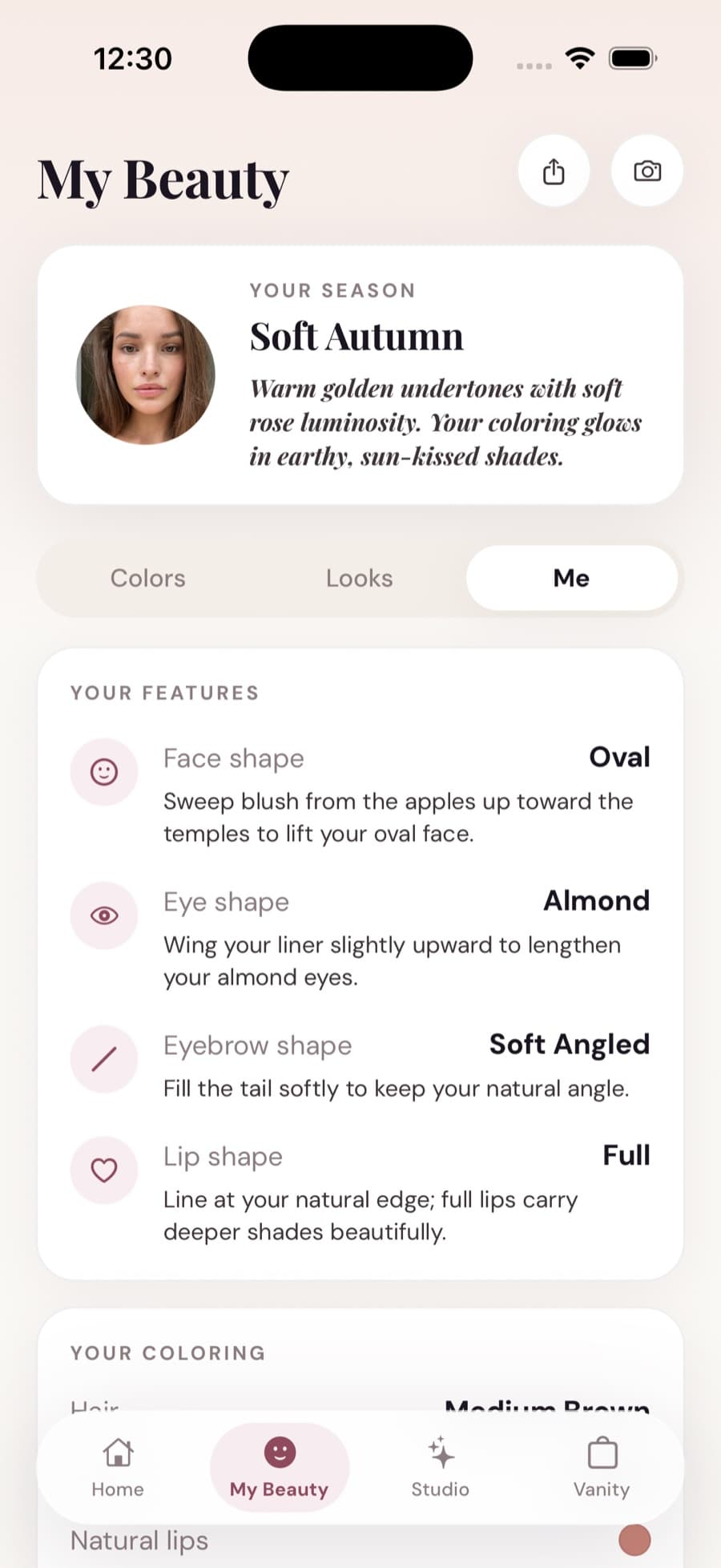
Glowmi builds a Beauty Profile from a bare-face selfie: your suggested color season, shades, complexion guidance, and looks adapted to your features. You can preview a look on your face and follow its tutorial. These are cosmetic suggestions, not clinical findings.
During onboarding you can see your season, a first shade, and your first look. Glowmi Pro unlocks the full experience afterward, with no free trial and fair daily and monthly AI usage limits. Glowmi is available on iOS; see the App Store for current plans.
Sources and further reading
Brand references describe their own methods and products. Our worked examples are illustrative, not records of product tests.
- Adobe: white balance, temperature, and tint
Background on how image color casts and color adjustments affect a photograph.
- Glowmi Privacy Policy
Our description of how photos and AI requests are handled.
- How Glowmi’s face scan works
Our app’s features and limits; this is product information, not independent validation.
Keep reading
What Is Skin Undertone? A Practical Guide for Makeup
Understand undertone versus skin depth, compare real swatches, and turn mixed results into useful shade notes without relying on one shortcut.
How to Find Your Foundation Shade Without Guessing
Find a foundation shade by comparing depth, undertone, and settled wear. Follow a jawline test and record what to change before buying again.
Virtual Makeup Try-On: Preview Makeup on Your Own Face
Preview makeup on your own face before applying it. See Glowmi’s before-and-after example, compare looks, and turn a preview into a real makeup plan.